Intune – Mobile Device Management – Device Enrolment – Add a Device
Lets focus on BYOD (Bring Your Own Device)
Example Apple – iOS enrolment
BYOD
- Devices are not wiped during enrolment
- Device is associated with a user
- Users can unenroll the device
At this point we have already completed the Pre Req’s (See Apple MDM Push Certificate if you haven’t done this already)
Apple Configurator / Devices
https://devicemanagement.microsoft.com
We need to add an iOS device you will need the serial number and device detail in a CSV file to import
CSV format <device serial>,<Detail Owner? Device type)

Add a device

Devices> iOS > Apple Configurator

Have you created a Profile? Create a Profile before adding a device, see this guide
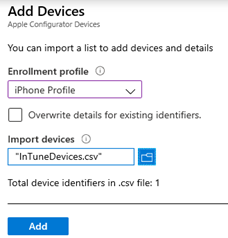
Select a profile and import your CSV file contain all your devices. Then click add.
Success !! Devices Added

Additional info from Microsoft Docs available here
